Functional Design for Trip-Based Fuel Consumption Service
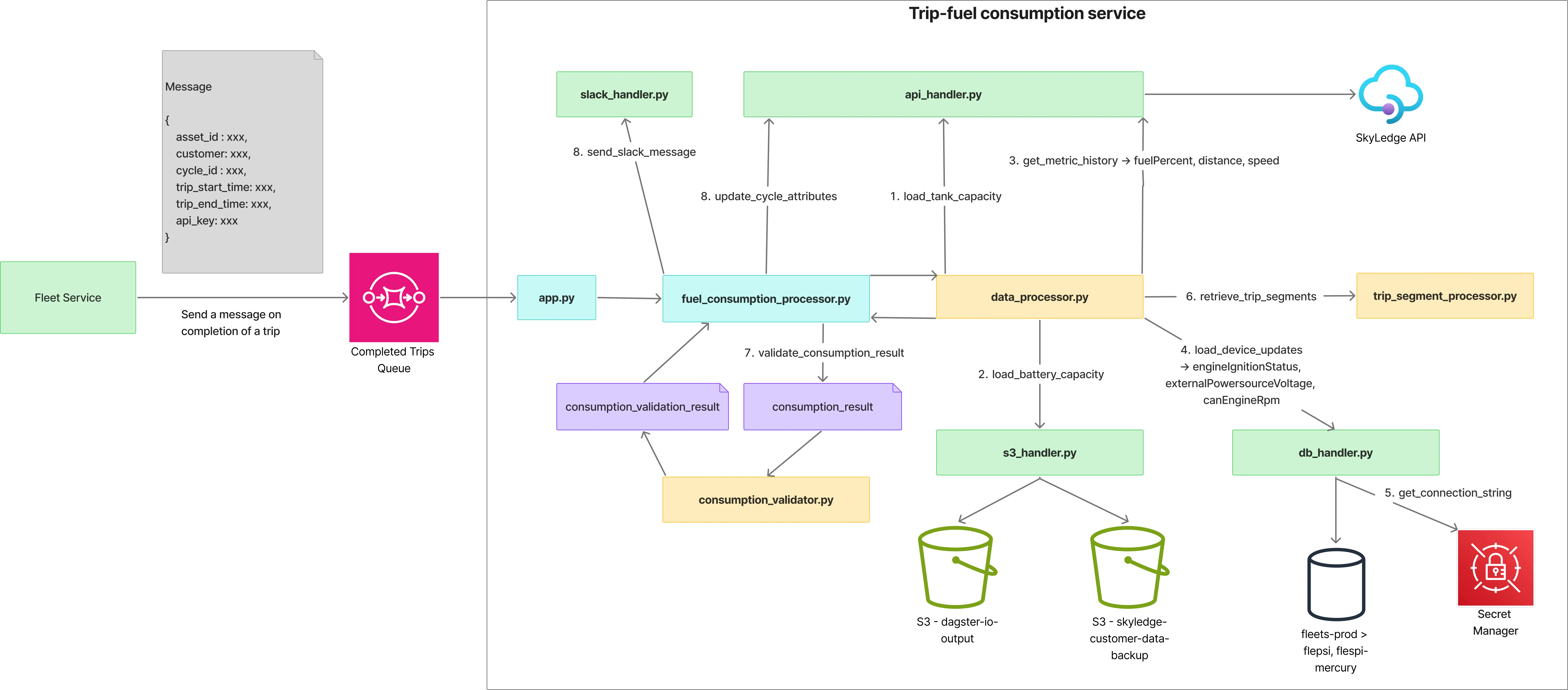
app.py
- Main entry point to the Lambda service.
- Accepts an SQS message, validates its content, and passes it to
fuel_consumption_processor.py.
fuel_consumption_processor.py
- Orchestrates the fuel consumption workflow by calling:
data_processor.pyto calculate fuel consumption.consumption_validator.pyto validate the consumption result.api_handler.pyto update cycle attributes when the consumption result is valid.slack_handler.pyto send a message to a Slack channel if validation fails.
data_processor.py
-
Initiates fuel consumption calculation by loading and preparing data:
- Offsets the trip start timestamp by going back 1 hour to help smooth the data.
- Loads
fuelPercent,speed, anddistancemetric history viaapi_handler.py. - Loads
device_updatesfor the specified device and time period viadb_handler.py. - Merges all datasets based on timestamps, allowing a tolerance of 1s.
-
Preprocesses the merged dataset:
- Resamples
speed,fuelPercent,canEngineRpm,externalPowersourceVoltage,engineIgnitionStatus, anddistanceto 1-second intervals and fills missing values. - Applies a median filter to
fuelPercentusing a dynamic kernel:- Kernel size is determined by trip duration:
301if duration < 30 minutes901if 30 ≤ duration < 60 minutes1501if duration ≥ 60 minutes
- Kernel size is determined by trip duration:
- Trims the dataset back to the original trip time range, removing the 1-hour offset applied earlier.
- Resamples
-
Calls
trip_segment_processor.pyto derive trip segments using the preprocessed data. -
Calculates the overall
consumption_result, including:consumption_idleconsumption_movingrefill_litersstart_fuel_levelend_fuel_levelconsumption_liters_per_100kmconsumption_km_per_litermileage
trip_segment_processor.py
- Handles the core logic for segmenting the preprocessed dataset and calculating fuel consumption.
- Divides the trip into stationary and moving segments; idle segments are then detected from stationary segments.
Idle Detection
- Uses RPM idle thresholds when RPM values are available.
- Otherwise, uses voltage thresholds.
- Consecutive idle segments within a stationary period that are separated by less than 60 seconds are merged into a single idle segment.
Segment Consumption
- For each moving and idle segment, fuel consumption is calculated by:
- Identifying refill points.
- Splitting segments into before-refill and after-refill subsegments.
- Calculating consumption as the difference between start and end fuel levels.
consumption_validator.py
- Once the
consumption_resultis calculated, it is validated here. - An error value for fuel consumption (in liters) is calculated.
fuel_consumption_error = |(start_fuel_level - end_fuel_level) + refill_liters - (consumption_idle + consumption_moving)|- This error was previously calculated across multiple trips to determine acceptable thresholds:
- Threshold = 1.54 L (~2 L) for trip duration of 0–5 minutes
- Threshold = 2.41 L (~3 L) for trip duration of 5–30 minutes
- Threshold = 2.65 L (~3 L) for trip duration of 30–60 minutes
- Threshold = 4.17 L (~5 L) for trip duration of 60+ minutes
- A confidence score is calculated based on these thresholds and the error.
- If
fuel_consumption_error <= threshold:confidence = 1.0 - 0.1 * (fuel_consumption_error / threshold)- This ensures the confidence remains high (between 0.9 and 1.0) as long as the error is within the threshold.
- If
fuel_consumption_error > threshold:confidence = max(0.0, 0.9 * (1.0 - ((fuel_consumption_error - threshold) / threshold)))- This ensures the confidence decreases progressively to 0 as the error increases beyond the threshold.
- If
- Returns a
consumption_validation_resultcontaining:valid—trueifconfidence >= 0.75, otherwisefalseconfidence
api_handler.py
- Loads metric history by calling the Sky Ledge API.
- Loads the tank capacity of the asset by calling the GET asset endpoint.
- Updates cycle attributes by calling the PATCH endpoint.
db_handler.py
- Handles loading device updates from the fleet database for a given device over a specified time period.
- Calls AWS Secrets Manager to retrieve the database cluster URI.
s3_handler.py
- Loads organization data from the
skyledge-customer-data-backupS3 bucket for a given customer. - Retrieves the API URL and API key from the data and updates a global cache.
- This helps avoid repetitive S3 requests when multiple Lambda invocations occur simultaneously without the instance shutting down.
- Retrieves the battery capacity of an asset by loading data from the
dagster/asset_battery_capacity/..S3 location. - Loads the customer-specific instance from the
prod/instanceS3 location.- This is used to determine which database collection to access (
flespiorflespi-mercury). - The result is cached globally to avoid repeated S3 calls, as described above.
- This is used to determine which database collection to access (
slack_handler.py
- Sends Slack messages to a given channel.
log_utils.py
- Instantiates a global logger with structured logging capabilities that can be used across the application.
constants.py
- Contains all DataFrame-related constants.